Available Number of Questions: Maximum of
50 Questions
Exam Name: Adobe Marketo Engage Business Practitioner Expert
Exam Duration: 110 Minutes
Related Certification(s):
Adobe Marketo Engage Certification
Adobe AD0-E559 Exam Topics - You’ll Be Tested in Actual Exam
The Adobe AD0-E559 exam is designed to assess your knowledge and skills in utilizing Adobe Experience Platform, a powerful toolset for managing and optimizing digital experiences. To excel in this exam, you must grasp the fundamentals of the platform's architecture and its role in data-driven decision-making. The exam covers a wide range of topics, including data collection and activation techniques, where you'll learn to leverage Adobe's tools to gather and activate customer data effectively. Identity management is a critical aspect, ensuring a unified view of customers across various touchpoints. Privacy and security are also emphasized, ensuring you understand the ethical and legal considerations in data handling. Audience segmentation is another key area, teaching you to create targeted customer segments for personalized experiences. Additionally, the exam delves into Adobe's advertising and personalization features, enabling you to create tailored campaigns. Reporting and analytics are crucial for measuring the success of your strategies, and Adobe Sensei, the AI and machine learning platform, enhances your data analysis capabilities. By mastering these topics and gaining hands-on experience, you'll be well-prepared to tackle the AD0-E559 exam and showcase your expertise in leveraging Adobe Experience Platform to create exceptional digital experiences.
Adobe AD0-E559 Exam Short Quiz
Attempt this Adobe AD0-E559 exam quiz to self-assess your preparation for the actual Adobe Marketo Engage Business Practitioner Expert exam. CertBoosters also provides premium Adobe AD0-E559 exam questions to pass the Adobe Marketo Engage Business Practitioner Expert exam in the shortest possible time. Be sure to try our free practice exam software for the Adobe AD0-E559 exam.
1of 0 questions |
Adobe AD0-E559 Exam Quiz
✓ 0 answered
🔖 0 bookmarked
AdobeAD0-E559
Q1:
There is a need to configure a Trigger based Smart Campaign that scores a 'Person' when at least five tracked webpages have been visited in a 24 hour window.
With the use of the 'Visits Web Page" Trigger, how would this be achieved?
○
AEdit the Qualification Rules' of the Smart Campaign to be set as once every one day.
○
BAlongside the Trigger, include a Filter' to the Smart List of Visited Web Page', with Date of Activity' and Visits Web Page' Constraints.
○
CAdd the Min. Number of Times' and Date of Activity' Constraints to the existing Visits Web Page' Trigger.
AdobeAD0-E559
Q2:
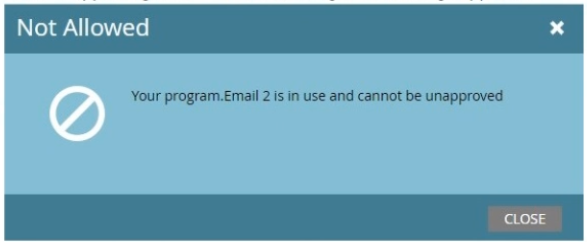
A marketer is building a new program. One of the emails he created is no longer needed so he tries to unapprove the email and delete it.
When unapproving the email the following error message appears.
How can he find out where the email is still being used?
○
AIn the Audit Trail of the Admin screen
○
BIn the Used By tab of the email
○
CIn the Used By page of the program
AdobeAD0-E559
Q3:
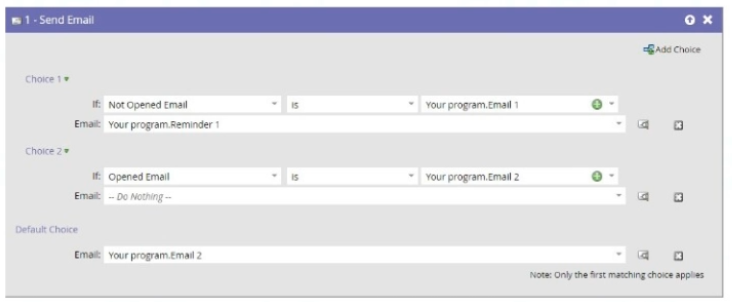
Review the flow step from a smart campaign:
Which email will a person receive who has opened Email 1, but not Email 2?
○
AThey will receive no email.
○
BThey will receive Email 2.
○
CThey will receive Reminder 1.
AdobeAD0-E559
Q4:
Jay has set up a webinar program and successfully connected it to a launchpoint webinar provider. The webinar confirmation email is using the {{member.webinar url}} token of a Adobe Marketo Engage program. The webinar program is live and 40 people have registered on a Adobe Marketo Engage LP and have a program status of registered and received a confirmation email. However, the unique link for all registrants is not being populated.
What are two things that Jay could try to identify the issue? (Choose two.)
☐
ALook in field management to check the value of the token.
☐
BGo into the Members tab of the webinar program and check if any person has the program status of Registration Error'.
☐
CGo into the Members tab of the webinar program and change the program status on the 40 persons that have a status of 'Members' to Registered.
☐
DGo into the Members tab of the webinar program and check that the webinar url column is populated using a custom view.
AdobeAD0-E559
Q5:
An Adobe Marketo Engage event program is connected with a Webinar provider. What program status is mandatory to populate the {{member.webinar url}} token?
○
ARegistered
○
BAny statuses, as long as the person is a member of the program