
AutoDesk
RVT_ELEC_01101
Q1:
How can an electrical designer see changes from other users without saving their own work to the central model?
○
A
Relinquish All Mine○
B
Reload Latest○
C
Manage Worksets○
D
Worksharing Display
AutoDesk
RVT_ELEC_01101
Q2:
Refer to exhibit.
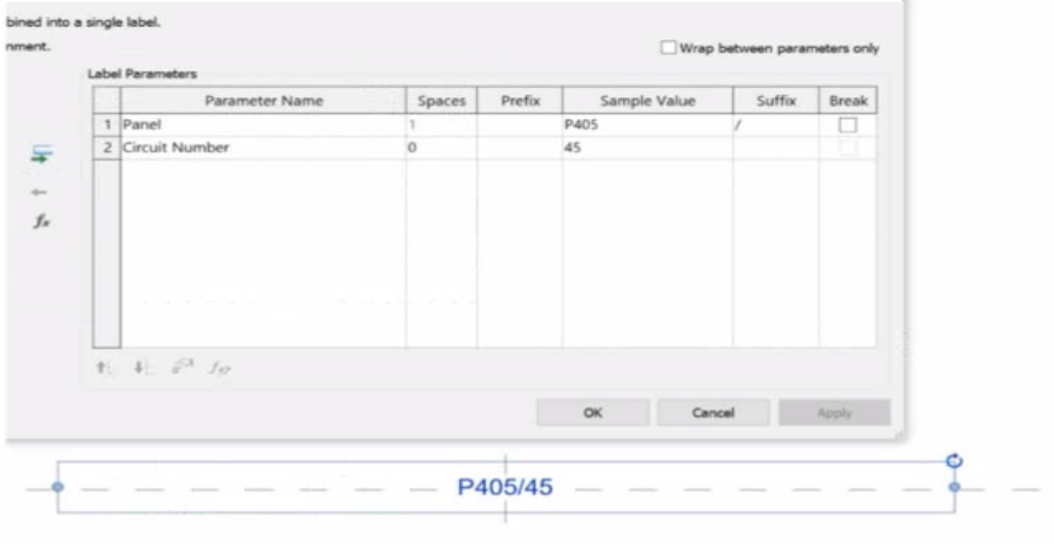
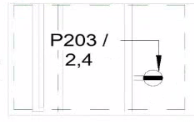
An electrical designer is working on an Electrical Device Panel-Circuit tag. The designer tags a receptacle using the tag properties shown in the exhibit The receptacle is assigned to panel P203 and circuit 2.4.
Which option shows the correct tag?
A)
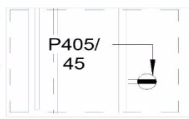
B)
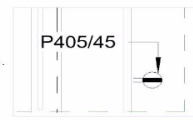
C)
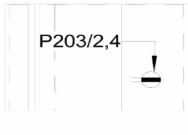
D)
○
A
Option A○
B
Option B○
C
Option C○
D
Option D
AutoDesk
RVT_ELEC_01101
Q3:
An electrical designer wants to add a parameter to a lighting fixture schedule without editing the families. Which parameter type should the designer use?
○
A
Schedule parameter○
B
Project parameter○
C
Global parameter○
D
Family parameter
AutoDesk
RVT_ELEC_01101
Q4:
When creating a power circuit, which two rules are enforced by the program? (Select two.)
☐
A
Items on the circuit must be in the same model.☐
B
Items on the circuit must have an apparent load value assigned.☐
C
Items on the circuit must be assigned the same voltage definition☐
D
Items on the circuit must be in the same workset.☐
E
Items on the circuit must be associated with a transformer.
AutoDesk
RVT_ELEC_01101
Q5:
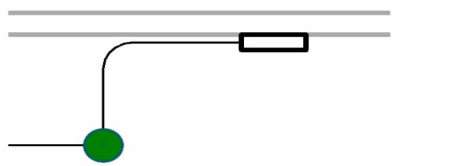
Refer to the exhibit.
○
A
Project Browser > Conduits > Conduits with Fittings > Single Line Symbology○
B
Properties > Edit Type > Single Line Symbology○
C
Object Styles > Conduits > Rise/Drop > Single Line Symbology○
D
Electrical Settings > Conduit Settings > Rise Drop > Single Line Symbology