Available Number of Questions: Maximum of
95 Questions
Exam Name: Avaya Aura Communication Applications Support Certified Exam
Exam Duration: 90 Minutes
Related Certification(s):
Avaya ACSS Certification
Avaya 72301X Exam Topics - You’ll Be Tested in Actual Exam
The Avaya 72301X exam is a comprehensive assessment designed to evaluate your knowledge and skills in implementing and managing Avaya's communication solutions. It covers a wide range of topics, ensuring that you have a deep understanding of Avaya's technology stack. One of the key areas is Avaya Aura® Communication Manager administration, where you'll learn to configure and manage call processing, media servers, and system maintenance. You'll also explore the IP Office™ Platform, its features, and how it integrates with Avaya Aura® solutions. Understanding Avaya Aura® Session Manager and Communication Manager is crucial, as it forms the foundation for advanced call control and routing. Additionally, you'll delve into the Avaya Aura® System Manager, which plays a vital role in system administration and monitoring. Contact center deployment is another significant aspect, with a focus on Avaya Aura® Contact Center and its capabilities in handling customer interactions. You'll also learn about reporting and analytics, enabling you to make data-driven decisions. Troubleshooting and maintenance practices are essential to ensure the smooth operation of Avaya systems. By mastering these topics, you'll be well-prepared to tackle the Avaya 72301X exam and showcase your expertise in implementing and managing Avaya's communication solutions.
Avaya 72301X Exam Short Quiz
Attempt this Avaya 72301X exam quiz to self-assess your preparation for the actual Avaya Aura Communication Applications Support Certified Exam . CertBoosters also provides premium Avaya 72301X exam questions to pass the Avaya Aura Communication Applications Support Certified Exam in the shortest possible time. Be sure to try our free practice exam software for the Avaya 72301X exam.
1of 0 questions |
Avaya 72301X Exam Quiz
✓ 0 answered
🔖 0 bookmarked
Avaya72301X
Q1:
To log on the one-X Communicator to Avaya Aura Presence Services server, what do you enter in the IM and Presence / Server field of the one-X Communicator?
○
Athe management IP-Address of FQDN of Avaya Breeze server
○
Bthe management IP-Address of FQDN of Avaya Aura Session Manager (SM)
○
Cthe SM100 IP-Address of FQDN of Avaya Aura Session Manager (SM)
○
Dthe SM100 IP-Address or FQDN of Avaya Breeze server
Avaya72301X
Q2:
In which three modes can you use the command traceSBC in Avaya Session Border Controller? (Choose
three.)
☐
AAutomatic mode
☐
BReal-time mode
☐
CLadder mode
☐
DSummary-time mode
☐
ENon real-time mode
Avaya72301X
Q3:
In which way can you check the version of Presence Services snap-in installed on the Avaya Breeze
platform?
○
AUse puTTY SSH to the Avaya Breeze platform, login as cust, then execute the swversion command.
○
BUse Avaya Aura System Manager and navigate to Elements > Breeze > Server Administration, and read the version displayed.
○
CUse Avaya Aura System Manager and navigate to Elements > Breeze > Service Management >
Services, and read the version displayed.
○
DUse puTTY SSH to the Avaya Breeze platform, login as cust, then execute the swversion --
PresenceServices command.
Avaya72301X
Q4:
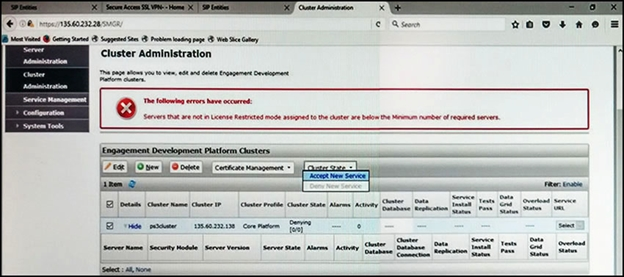
Refer to the exhibit.
In the Cluster Administration screen of a PresenceServices cluster, when you try to change the cluster state to Accept New Service, you receive the error:
Servers that are not in License Restricted mode assigned to the cluster are below the Minimum number of required servers.
You check that a server has been administered under Breeze > Server Administration which shows green check under License Mode, and a System State of Denying.
Which action needs to be taken to solve this problem?
○
AEdit the Cluster, access the Servers tab, and assign the server to the cluster; then set the cluster to Accept New Service.
○
BUnder Avaya Breeze > Server Administration, select the server and change the System State to Accept New Service, then return to the Cluster Administration screen and set the cluster to Accept New Service.
○
CObtain and install an Avaya Breeze license on webLM with more instances of Avaya Breeze nodes.
○
DEdit the cluster to change the cluster profile from Core Platform to General Purpose.
Avaya72301X
Q5:
A customer reports that they cannot place calls to the Public Network using the SIP Service Provider after a technician had finished fixing an issue in the Session Border Controller (SBC).
Within Avaya SBC, in which three places do you check the configuration of the SIP Trunks? (Choose three.)