
A developer identifies the following triggers on the Expense _c object:
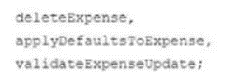
The triggers process before delete, before insert, and before update events respectively.
Which two techniques should the developer implement to ensure trigger best practices are followed?
Choose 2 answers
An Apex method, getAccounts, that returns a List of Accounts given a searchTerm, is available for Lightning Web Components to use.
What is the correct definition of a Lightning Web Component property that uses the getAccounts method?
A. @wire(getAccounts, { searchTerm: '$searchTerm' }) B. @track(getAccounts, '$searchTerm') C. @wire(getAccounts, 'searchTerm: $searchTerm') D. @wire(getAccounts, '$searchTerm')
Syntax: Uses @wire to call getAccounts and passes parameters as an object { searchTerm: '$searchTerm' }.
Parameter Mapping: The searchTerm parameter of the getAccounts Apex method is mapped to the LWC's searchTerm property. The $searchTerm syntax indicates that searchTerm is a reactive property, and getAccounts will be re-invoked if searchTerm changes.
Correctness: This matches the standard LWC syntax for wiring an Apex method with parameters. The Lightning Web Components Developer Guide confirms: ''Pass parameters to an Apex method as a JavaScript object, using the $ prefix for reactive properties'' (Salesforce Lightning Web Components Developer Guide, Call Apex Methods).
Conclusion: Correct, as it uses the proper @wire syntax and parameter format.
Syntax: Uses @track instead of @wire.
Decorator: The @track decorator is used to make a property reactive, meaning the component re-renders when the property changes, but it does not wire the property to a data source like an Apex method. The Lightning Web Components Developer Guide states: ''@track is used to mark a property as reactive for re-rendering, but it does not fetch data from a server'' (Salesforce Lightning Web Components Developer Guide, Reactive Properties).
Parameter: Passing getAccounts and '$searchTerm' to @track is invalid, as @track does not accept arguments in this manner.
Conclusion: Incorrect, as @track cannot be used to wire an Apex method.
Syntax: Uses @wire to call getAccounts, but the parameters are passed as a string 'searchTerm: $searchTerm'.
Parameter Format: The @wire decorator expects the second argument to be a JavaScript object (e.g., { searchTerm: '$searchTerm' }), not a string. The Lightning Web Components Developer Guide specifies: ''The second argument to @wire for an Apex method must be an object mapping parameter names to values'' (Salesforce Lightning Web Components Developer Guide, Pass Parameters to Apex Methods). Passing a string like 'searchTerm: $searchTerm' results in a runtime error or the Apex method not being called correctly.
Conclusion: Incorrect, as the parameter format is invalid (string instead of an object).
Syntax: Uses @wire to call getAccounts, but passes '$searchTerm' directly as a string, not as a parameter object.
Parameter Format: The getAccounts method expects a parameter named searchTerm, so the correct format is { searchTerm: '$searchTerm' }. Passing '$searchTerm' as a single value does not map to the Apex method's parameter name, causing the method to receive no value for searchTerm (or fail entirely). The Lightning Web Components Developer Guide notes: ''Parameter names in the object must match the Apex method's parameter names'' (Salesforce Lightning Web Components Developer Guide, Call Apex Methods).
Conclusion: Incorrect, as the parameter is not passed as a properly formatted object mapping to the Apex method's parameter.
Why Option A is Correct:
Option A is correct because:
It uses the @wire decorator to properly connect the getAccounts Apex method to an LWC property.
It passes the searchTerm parameter in the correct format: { searchTerm: '$searchTerm' }, mapping the Apex method's parameter to the LWC's reactive searchTerm property.
The $searchTerm syntax ensures reactivity, so the getAccounts method is re-invoked when searchTerm changes, aligning with LWC best practices.
This matches the standard syntax outlined in the Salesforce Lightning Web Components Developer Guide for wiring Apex methods with parameters.
Example for Clarity:
Here's how option A would be used in a complete LWC JavaScript file:
javascript
Copy
import { LightningElement, wire } from 'lwc';
import getAccounts from '@salesforce/apex/AccountController.getAccounts';
export default class MyComponent extends LightningElement {
searchTerm = ''; // Reactive property for search term
// Wire the getAccounts Apex method to a property
@wire(getAccounts, { searchTerm: '$searchTerm' })
accounts;
// Example: Update searchTerm based on user input
handleSearchTermChange(event) {
this.searchTerm = event.target.value;
}
}
Apex Controller (for reference):
apex
Copy
public with sharing class AccountController {
@AuraEnabled(cacheable=true)
public static List<Account> getAccounts(String searchTerm) {
return [SELECT Id, Name FROM Account WHERE Name LIKE :('%' + searchTerm + '%')];
}
}
Behavior: When searchTerm changes (e.g., due to user input), the @wire decorator re-invokes getAccounts with the new searchTerm value, and the accounts property receives the result (e.g., { data: [/* Account records */], error: undefined }).
Handling Typos:
The options are syntactically correct in the provided image, with no typos to address. However, the options assume getAccounts is properly imported and defined in the Apex controller, which we infer based on the question's context.
The question's phrasing is clear, and the options align with typical LWC syntax patterns.
The value of the account type field is not being displayed correctly on the page. Assuming the custom controller is properly referenced on the Visualforce page, what should the developer do to correct the problem?
Which three statements are accurate about debug logs?
Choose 3 answers
A team of developers is working on a source-driven project that allows them to work independently, with many different org configurations.
Which type of Salesforce orgs should they use for their development?