
SAP
C_THR85_2505
Q1:
What options do you have to add users from the Add Population dialog in a custom profile slide?Note: There are 2 correct answers to this question.
☐
A
Add a team, starting from a given manager, and include a specified number of levels.☐
B
Import an Excel file containing a list of user IDs.☐
C
Import a CSV file containing a list of user names.☐
D
Select a dynamic group defined in the options under the Name menu.
SAP
C_THR85_2505
Q2:
Where can you import position data?Note: There are 2 correct answers to this question.
☐
A
Succession Position Management Import Positions☐
B
Employee Files Import and Export Data☐
C
Employee Files Manage Data☐
D
Employee Files Manage Positions
SAP
C_THR85_2505
Q3:
What can a user accomplish using the eye icon on the screen shown here?
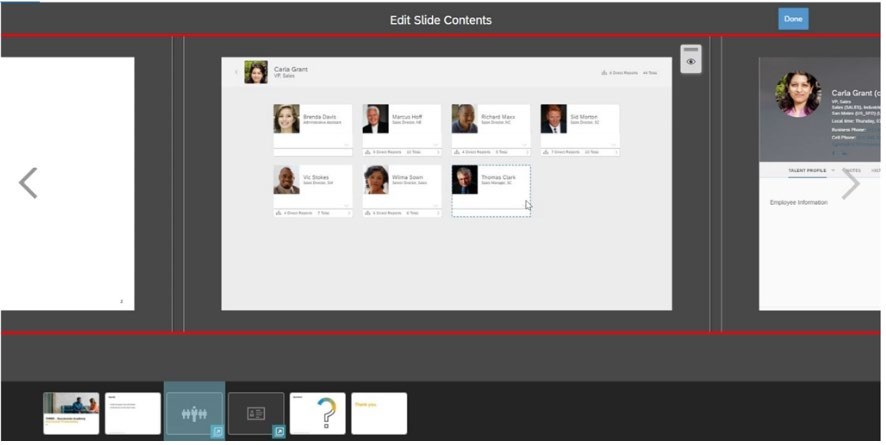
Note: There are 2 correct answers to this question.
☐
A
Show or hide the slide.☐
B
Show or hide hotspots.☐
C
Show or hide all direct reports.☐
D
Show or hide one or more direct reports.
SAP
C_THR85_2505
Q4:
When utilizing a talent pool in Succession, what actions can a user take?Note: There are 3 correct answers to this question.
☐
A
Add a new status.☐
B
Secure the Talent Pool object.☐
C
Set a readiness rating for an employee.☐
D
Filter nominations by date range.☐
E
Delete a nomination from the talent pool.
SAP
C_THR85_2505
Q5:
What information is included in the Background Data Import template?
○
A
Employee import data○
B
Trend data○
C
Education data○
D
Personal information data