
UiPath
UiPath-ADPv1
Q1:
What is the purpose of the Capture All Elements feature in Object Repository?
○
A
To capture the selected elements of an application from multiple screens simultaneously using the Computer Vision technology.○
B
To capture the selected elements of an application using the Computer Vision technology.○
C
To capture all the available elements of an application using the Computer Vision technology.○
D
To capture all elements of an application from multiple screens simultaneously using the Computer Vision technology.
UiPath
UiPath-ADPv1
Q2:
What is the main function of the UiPath Remote Runtime component?
○
A
It facilitates the communication between a remote application or desktop and the dedicated UiPath extension, allowing selectors to be natively generated in UiExplorer.○
B
It enables the use of OCR and image recognition activities on remote applications or desktops, without any extensions, allowing selectors to be natively generated in UiExplorer.○
C
It introduces support for headless browser automation, so browser automation doesn't necessarily have to rely on visual elements on screen, such as window frames.○
D
It allows automations to run on the user machine, in a different Windows session.
UiPath
UiPath-ADPv1
Q3:
Considering a process developed using REFramework, if the status of a transaction was set to "Failed" with the ErrorType specified as "Business", the process will transition to which state?
○
A
End Process○
B
Initialization○
C
Get Transaction Data○
D
Process Transaction
UiPath
UiPath-ADPv1
Q4:
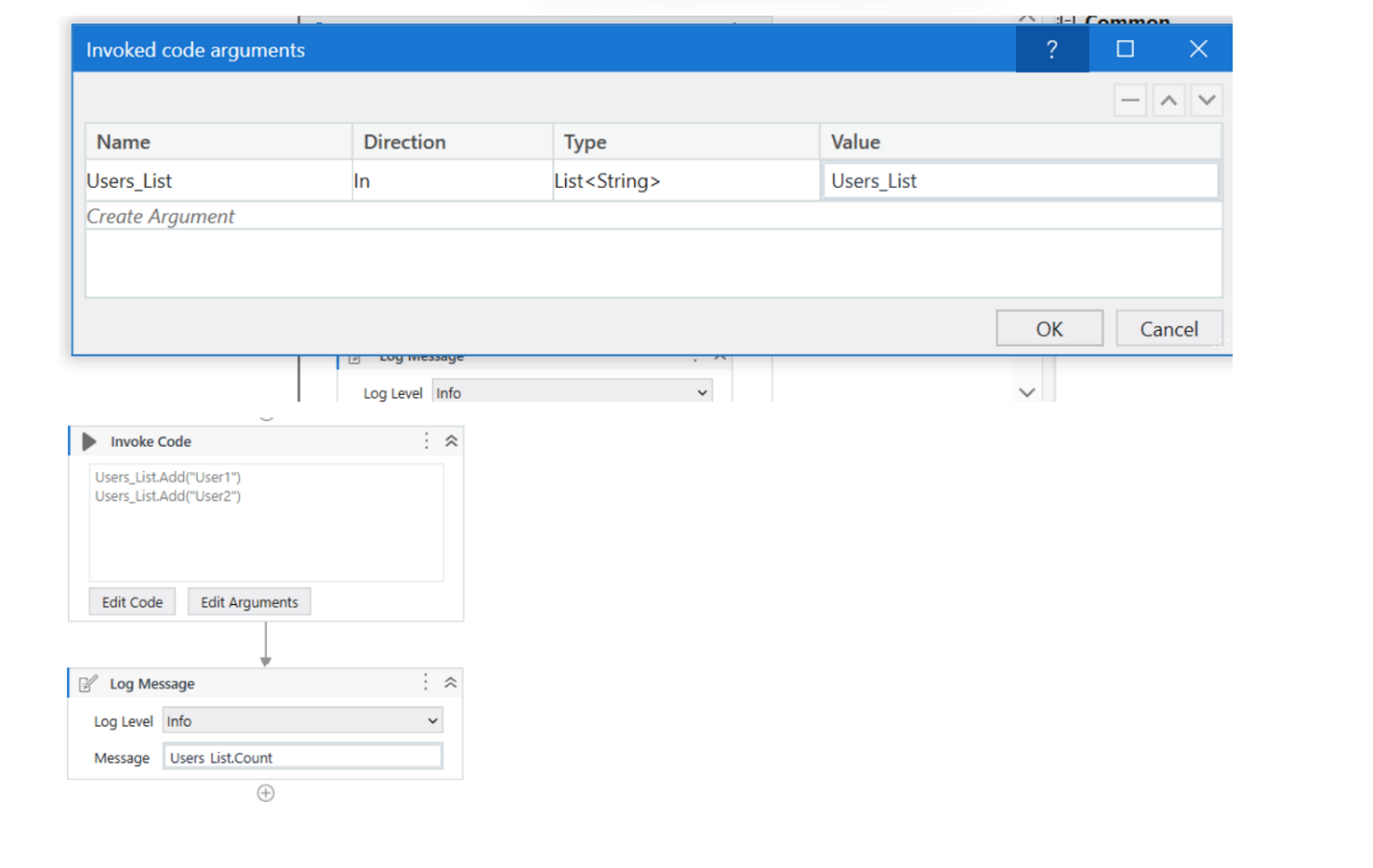
A developer has created a variable of type List of Strings named "Users_List", and initialized it with an empty list: "Users_List = new List(Of String)".
What is printed in the log message after the following Invoke Code is executed?
○
A
0○
B
2○
C
Object reference not set to an instance exception is thrown○
D
System Argument Exception is thrown
UiPath
UiPath-ADPv1
Q5:
What is the functionality of the Include Subfolders filter in the Monitoring pages when a modern folder is selected?
○
A
It allows you to choose between background and foreground processes for the displayed data.○
B
It allows you to select whether the contents of the selected folder's subfolders are displayed.○
C
It enables you to sort the displayed data based on job priorities.○
D
It allows you to allocate licenses per machine for the displayed data.