Related Certification(s):
UiPath UiARD Certification
UiPath UiPath-ARDv1 Exam Topics - You’ll Be Tested in Actual Exam
The UiPath-ARDv1 exam assesses your knowledge and skills in automation, RPA, and the UiPath platform. It covers a range of topics, including the fundamentals of automation and RPA, understanding the UiPath Platform and its components, creating and managing robots, working with UiPath Studio and its tools, and designing and developing automation processes. You'll learn about different types of automation, such as attended and unattended automation, and explore the benefits and use cases of RPA. The exam delves into the UiPath Platform, teaching you how to navigate and utilize its features effectively. You'll master the art of creating and managing robots, understanding their roles and configurations. UiPath Studio, the powerful development environment, is a key focus, where you'll learn to create workflows, activities, and sequences. The exam also emphasizes the importance of design principles and best practices in automation, ensuring your processes are efficient and maintainable. Additionally, you'll explore advanced topics like exception handling, error management, and security considerations. With a practical approach, the exam guides you through real-world scenarios, teaching you to troubleshoot and optimize your automation processes. By passing this exam, you'll not only demonstrate your expertise but also enhance your career prospects in the field of RPA.
UiPath UiPath-ARDv1 Exam Short Quiz
Attempt this UiPath UiPath-ARDv1 exam quiz to self-assess your preparation for the actual UiPath Advanced RPA Developer v1.0 Exam . CertBoosters also provides premium UiPath UiPath-ARDv1 exam questions to pass the UiPath Advanced RPA Developer v1.0 Exam in the shortest possible time. Be sure to try our free practice exam software for the UiPath UiPath-ARDv1 exam.
1of 0 questions |
UiPath UiPath-ARDv1 Exam Quiz
✓ 0 answered
🔖 0 bookmarked
UiPathUiPath-ARDv1
Q1:
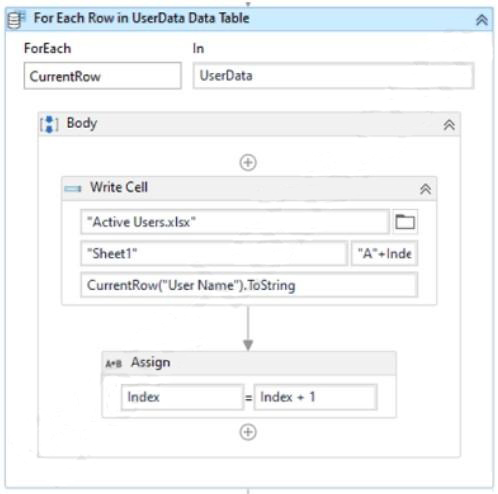
A developer has created the following sequence:
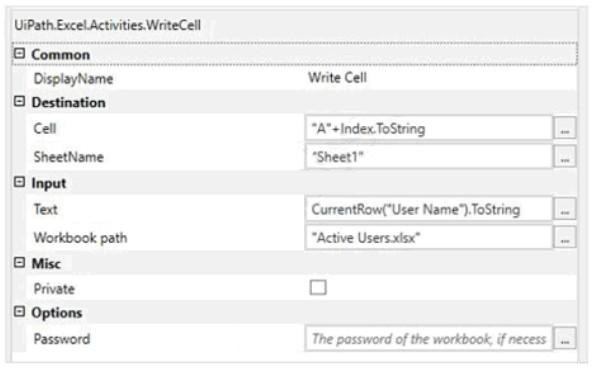
The Write Cell activity has the following properties:
What is the behavior of the sequence once executed?
○
AWrites the values in the same row in the Active Users.xlsx Excel file
○
BWrites the values in subsequent rows in the UserName datatable
○
CWrites the values in subsequent rows in the Active Users.xlsx Excel file
○
DWrites the values in the same row in the UserName datatable
UiPathUiPath-ARDv1
Q2:
A developer is working on an existing project in which GIT is used as the source control. Another team member wants to compare two versions of a particular workflow in this project. Which UiPath Studio option provides this capability?
○
APull (rebase)
○
BCheckout Branch
○
CShow History
○
DPush
UiPathUiPath-ARDv1
Q3:
You have two lists in a workflow:
1) FranceCities which contains city names in France
2) IndiaCities which contains city names in India
In order to show all city names from both lists, which expression should be used as the input to a MessageBox?
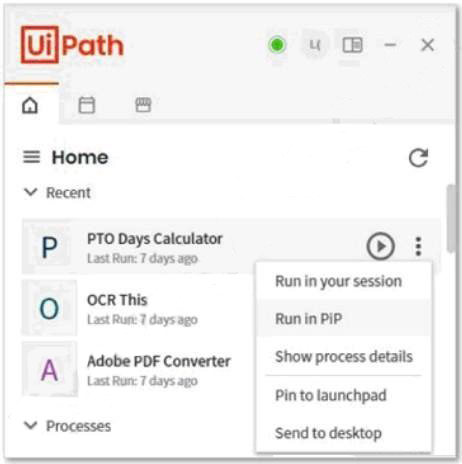
What is the result of clicking the "Run in PiP" button?
○
AThe attended process starts in an isolated Windows session.
The user is prompted with a window to enter credentials on every run.
○
BThe attended process starts on a remote machine.
The user is prompted with a window to enter credentials.
○
CThe attended process starts in an isolated Windows session.
The user is logged in with the credentials entered from the main session.
○
DThe attended process starts in the same Windows session.
The user is logged in automatically with their credentials.
UiPathUiPath-ARDv1
Q5:
A developer created an automation project in the Robotic Enterprise (RE) Framework which needs to enter a User ID depending on the machine it runs on. The User ID is stored in Orchestrator as a Text asset using the Value Per Account-Machine method.
Which steps should the developer perform to use this asset in the project?
○
AAdd a row in the Settings sheet in Config.xlsx with the name of the Orchestrator asset.
Use the Get Asset activity in the workflow to get the User ID.
○
BAdd a row in the Settings sheet in Config.xlsx with the name of the Orchestrator asset.
In the workflow, retrieve the User ID by referencing the Config dictionary.
○
CAdd a row in the Assets sheet in Config.xlsx with the name of the Orchestrator asset.
Use the Get Asset activity in the workflow to get the User ID.
○
DAdd a row in the Assets sheet in Config.xlsx with the name of the Orchestrator asset.
In the workflow, retrieve the User ID by referencing the Config dictionary.