Available Number of Questions: Maximum of
420 Questions
Exam Name: Managing Microsoft Teams
Exam Duration: 100 Minutes
Related Certification(s):
Microsoft Teams Administrator Associate Certification
Microsoft MS-700 Exam Topics - You’ll Be Tested in Actual Exam
When you prepare for MS 700, think of Microsoft Teams administration as a cycle of planning, controlling, and validating. Start with configuring and managing the Teams environment by understanding how tenant level settings shape user experience, including policies that govern messaging, meetings, and app access, plus the basic governance choices that keep collaboration consistent. Next, focus on managing teams, channels, chats, and apps by knowing how teams are created and maintained, how channel types support different work patterns, and how chat and collaboration features are influenced by policy. You should also be comfortable with app management, including allowing or blocking apps, pinning apps, and handling permissions so users get useful tools without risking sprawl. For meetings and calling, learn how meeting policies affect scheduling, lobby behavior, presenter controls, and conferencing features, and how calling settings support voice workloads, numbers, and user calling capabilities. Finally, monitoring, reporting, and troubleshooting ties everything together, since you need to read usage and quality signals, interpret common failure points, and apply a structured approach to resolve issues across sign in, chat, meetings, and voice. A steady exam mindset is to map every symptom or requirement back to the right policy, configuration area, or report, then confirm the change achieved the intended outcome.
Microsoft MS-700 Exam Short Quiz
Attempt this Microsoft MS-700 exam quiz to self-assess your preparation for the actual Microsoft Managing Microsoft Teams exam. CertBoosters also provides premium Microsoft MS-700 exam questions to pass the Microsoft Managing Microsoft Teams exam in the shortest possible time. Be sure to try our free practice exam software for the Microsoft MS-700 exam.
1of 0 questions |
Microsoft MS-700 Exam Quiz
✓ 0 answered
🔖 0 bookmarked
MicrosoftMS-700
Q1:
You have a Microsoft 365 E3 subscription that uses Teams. The subscription contains an administrator named Admin1 that is assigned the Teams Administrator role.
Admin1 reports that he can assign default policy packages to users but cannot create and assign custom policy packages.
You need to ensure that Admin1 can create and assign custom policy packages in Teams.
What should you do?
○
AFor Admin1, run the Grant-CsUserPolicyPackage PowerShell cmdlet.
○
BAssign a Teams Premium license to Admin1.
○
CFor Admin1. run the Grant-CsGroupPolicyPackageAssigment PowerShell cmdlet.
○
DAssign a Microsoft 365 E5 license to Admin1.
MicrosoftMS-700
Q2:
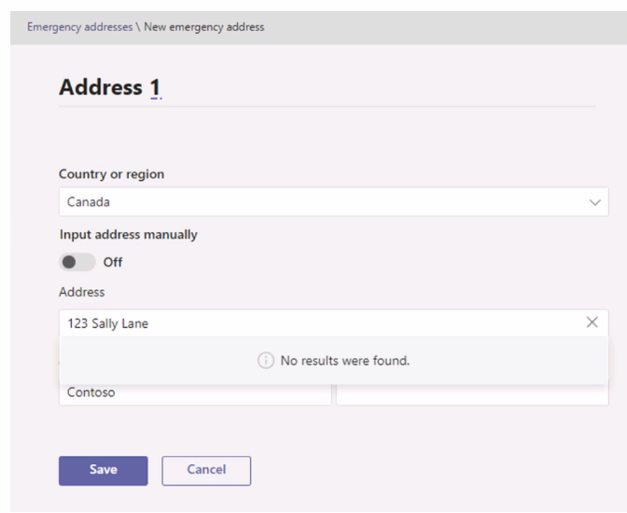
In the Microsoft Teams admin center, you attempt to add an emergency address as shown in the following exhibit.
You need to validate the address.
What should you do?
○
ASpecify the latitude and longitude of the location.
○
BProvide The Emergency Location Identification Number (ELIN) associated with the emergency address.
○
CCreate an emergency call routing policy.
○
DCreate an emergency calling policy.
MicrosoftMS-700
Q3:
You have a Microsoft 365 subscription that uses Teams.
You need to upload network IP subnet information to call analytics.
What should you configure?
○
AReporting labels
○
BNotification & alerts
○
CNetwork topology
○
DVoice application policies
MicrosoftMS-700
Q4:
You have a Microsoft 365 E5 subscription that uses Teams.
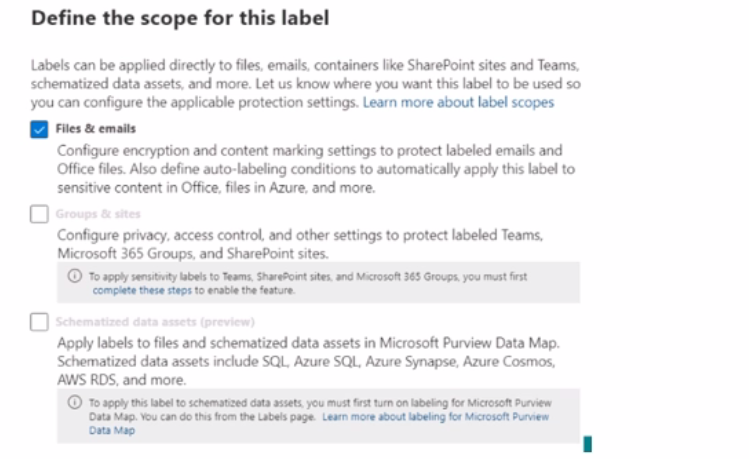
When you attempt to create a new sensitivity label for Teams, you discover that the Groups & sites option is unavailable as shown in the following exhibit.
You need to be able to select Groups & sites when you create the sensitivity label.
Which cmdlet should you run?
○
ASet-Uni-fiedQroup
○
BSet-AzureADDirectorySetting
○
CSet - SPOSiteoffice365Group
○
DSet-CsTeansEnhancedEncryptionPolicy
MicrosoftMS-700
Q5:
You have a Microsoft 365 E5 subscription that uses Teams.
You need to integrate Microsoft 365 Defender with Teams to prevent users from uploading malicious files to a Teams channel.
What should you do first?
○
ATurn on the Built-in protection (Microsoft) Safe Links policy.